Have you ever had your inner voice say to you 'you idiot' or 'you tool' or just 'Bravo' whilst clapping sarcastically (Homer: The Last Temptation of Homer)? Yeah, me too, twice this week in fact. The second instance was particularly embarrassing, so I think I should share it. It was more embarrassing as I was just complaining that morning about how the MongoDB drivers should probably implement basic functions such as this.
Now the eagle-eyed among you will spot this straight away, so please don't shout out the answer and spoil it for everyone else.
Imagine you have a collection - I'll keep it as small as possible so that the error stands out more - and you want to find the maximum value of "someNumber". Simples; I've done this a thousand times, well hundreds of times. I think for the first five times I had to find the max I implemented a different solution each time; back when I first started with Mongo.
I'm going to show only one way of finding the maximum value, I'm choosing this particular method for no other reason than it's probably the simplest and easiest to understand.
In this slightly contrived example I only have 10 documents in the collection and in my defence the collection I was working on had a few hundred thousand - not much of a defence granted, but henceforth I'll refer to it as the Jan Defence.
So, initially I ran this query:
Worked first time I thought. Rock on. Hang on... that number seems a bit low. Let's put in some logging:
Instead of the 10 represented here, replace that with a number as per the Jan Defence. Lets put in some more logging.
Again, remember the Jan Defence. Surely 50 isn't bigger than 200.
<penny drops/>
It is, if it is a String. 'You tool'.
Et voilà!
Fortunately I didn't burn too much time with this.
The moral of the story? You should store your numbers as numbers.
If anyone would like to see more implementations of finding the max and min values, I'm happy to share.
Wednesday, 28 March 2012

Monday, 12 March 2012
Mongodb MapReduce scope variables
I recently had a requirement for conditional emission from a map function. Essentially I only wanted to emit where the date was within a given range.
In SQL, grouping a count for a given time granularity within a date range would look something like this:
I wasn't 100% sure about the 'right way' to achieve this in NOSql/MongoDB. So this is a solution.
It requires you to know about scope variables. Problem is, I found that scope variables are not very well documented. You can find more about scope variables in the MongoDB documentation MapReduce-Overview. The relevant parts are:
[, scope : <object where fields go into javascript global scope >]
and
scope - can pass in variables that can be access from map/reduce/finalize.
Back to this example. First, let's define some data:
Before we implement this, lets get it working at the command-line, in our mongo shell:
What is happening here?
Well, we're selecting the sub-document of this collection where the value of "meh" is "meh". Then we've defined two dates; from and to to represent the boundaries of the date range, we're including these within the MapReduce function call. Basically what this means is that we can use what ever is defined here in the Map function (btw, we can also use them in the Reduce and Finalize functions).
Once we have this working from the shell, it is straight forward to implement it. This is the very same implemented in Java.
Caveat: This is an example of how to use scope variables, I'm sure if you go to any of the Events or gmane.comp.db.mongodb.user group you'll get some advice straight from the 10Gen guys.
In SQL, grouping a count for a given time granularity within a date range would look something like this:
I wasn't 100% sure about the 'right way' to achieve this in NOSql/MongoDB. So this is a solution.
It requires you to know about scope variables. Problem is, I found that scope variables are not very well documented. You can find more about scope variables in the MongoDB documentation MapReduce-Overview. The relevant parts are:
[, scope : <object where fields go into javascript global scope >]
and
scope - can pass in variables that can be access from map/reduce/finalize.
Back to this example. First, let's define some data:
Before we implement this, lets get it working at the command-line, in our mongo shell:
What is happening here?
Well, we're selecting the sub-document of this collection where the value of "meh" is "meh". Then we've defined two dates; from and to to represent the boundaries of the date range, we're including these within the MapReduce function call. Basically what this means is that we can use what ever is defined here in the Map function (btw, we can also use them in the Reduce and Finalize functions).
Once we have this working from the shell, it is straight forward to implement it. This is the very same implemented in Java.
Caveat: This is an example of how to use scope variables, I'm sure if you go to any of the Events or gmane.comp.db.mongodb.user group you'll get some advice straight from the 10Gen guys.
Friday, 9 March 2012
Changing date types; from JavaScript UTC to Mongo ISODate
The scenario is this.
You have an HTML form that allows your customer to add an arbitrary amount of stuff to something. stuff is a partial JSON document which is a list of String/String and String/Date NVPs contained within something. Mongo will by default store the date as an ISODate. With that said, the something collection looks something like this:
The simple solution to the format issue is to display the Date as an ISODate on the form, thus when the form is submitted, the date can be treated just like any other string (though you still need to tell mongo to treat it as a Date and not a String, so you need to 'find' it and change the type; more on that later).
Would display: 2011-11-01T11:51:46.000Z
But that would be way too easy; in the real world, easy is considered as rare as unicorn herders. The Use Case/User Story/Whatever acceptance criteria is that we display the Date in the full UTC form. OK then.
Which would display: Tue Nov 01 2011 11:51:46 GMT+0000 (GMT Standard Time)
This is easily done, in fact, it is easier than displaying it as an ISODate, but now we have to parse it and convert to an ISODate, which involves finding it in the JSON document first.
Parsing a UTC date into an ISO is trivial but should have been easier than this - I needed to faff around with the DateFormat string before I got rid of the ParseExceptions.
This is roughly how I did it. Doesn't look too pretty tbh.
It's amazing how simple this should be. You set it up as a date, you pass in a date, yet you still need to explicitly convert it from initially from a String to Date, and then from UTC to ISO.
You have an HTML form that allows your customer to add an arbitrary amount of stuff to something. stuff is a partial JSON document which is a list of String/String and String/Date NVPs contained within something. Mongo will by default store the date as an ISODate. With that said, the something collection looks something like this:
The simple solution to the format issue is to display the Date as an ISODate on the form, thus when the form is submitted, the date can be treated just like any other string (though you still need to tell mongo to treat it as a Date and not a String, so you need to 'find' it and change the type; more on that later).
Would display: 2011-11-01T11:51:46.000Z
But that would be way too easy; in the real world, easy is considered as rare as unicorn herders. The Use Case/User Story/Whatever acceptance criteria is that we display the Date in the full UTC form. OK then.
Which would display: Tue Nov 01 2011 11:51:46 GMT+0000 (GMT Standard Time)
This is easily done, in fact, it is easier than displaying it as an ISODate, but now we have to parse it and convert to an ISODate, which involves finding it in the JSON document first.
Parsing a UTC date into an ISO is trivial but should have been easier than this - I needed to faff around with the DateFormat string before I got rid of the ParseExceptions.
This is roughly how I did it. Doesn't look too pretty tbh.
It's amazing how simple this should be. You set it up as a date, you pass in a date, yet you still need to explicitly convert it from initially from a String to Date, and then from UTC to ISO.
Tuesday, 6 March 2012
Neo4j: Mechanically Sympathetic
About a month ago I was 5 minutes late for a #skillsmatter event, a talk on #neo4j and mechanical sympathy. The talk was given by a #neo4j employee, thus given by someone in-the-know.
Because of my tardiness I missed why neo4j is mechanically sympathetic; the whole point of the talk. I should have had a chat with the presenter after the talk to clear up my lack of understanding, however the Slaughtered Lamb is not as conducive to conversation as it once was...
Are we saying that neo4j is mechanically sympathetic in terms of the records being powers of 2, or that the talk allows us to understand how neo4j works in the same way that Jackie Stewart knew how his cars worked because he had previously worked as a mechanic? I'm guessing the later as the neo4j cheat sheet shows records as 5, 9, 25 and 33 bytes, not exactly powers of 2.
A question came up during the session about the how many nodes you could have; the maximum NodeRecordIdSize. The response was that it wasn't 4 bytes as shown on the cheat sheet, but 4 bytes, plus 7 bits. The suggestion was that you could use the 7 'spare' bits of the 'in use' byte as only 1 bit of this byte is actually used.
With that said, my questions is, how would that affect the 4 byte reference allocation in, for instance, the RelationshipRecord, which is only allocated 4 bytes? Where are the 7 'spare bits' stored?
Because of my tardiness I missed why neo4j is mechanically sympathetic; the whole point of the talk. I should have had a chat with the presenter after the talk to clear up my lack of understanding, however the Slaughtered Lamb is not as conducive to conversation as it once was...
Are we saying that neo4j is mechanically sympathetic in terms of the records being powers of 2, or that the talk allows us to understand how neo4j works in the same way that Jackie Stewart knew how his cars worked because he had previously worked as a mechanic? I'm guessing the later as the neo4j cheat sheet shows records as 5, 9, 25 and 33 bytes, not exactly powers of 2.
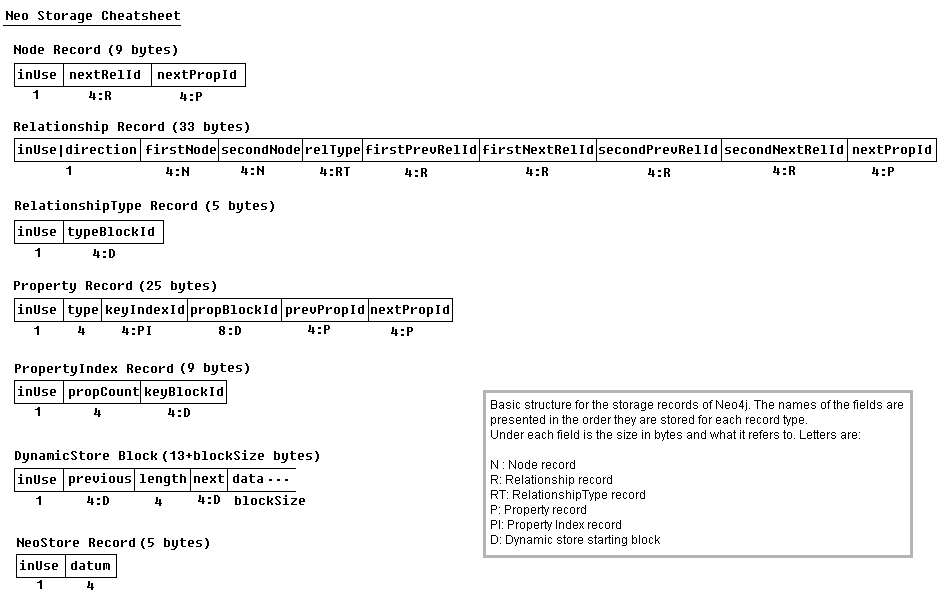
A question came up during the session about the how many nodes you could have; the maximum NodeRecordIdSize. The response was that it wasn't 4 bytes as shown on the cheat sheet, but 4 bytes, plus 7 bits. The suggestion was that you could use the 7 'spare' bits of the 'in use' byte as only 1 bit of this byte is actually used.
With that said, my questions is, how would that affect the 4 byte reference allocation in, for instance, the RelationshipRecord, which is only allocated 4 bytes? Where are the 7 'spare bits' stored?
From form to collection
I know I haven't posted anything for a while. The reason for that has been a mixture of being quite busy at work and home, sheer laziness and being on leave.
I've been hacking around for the last hour trying to find the easiest/quickest way to update an array of name/date pairs within a collection from a form, and its slowing dawning on my there is no elegant or even cheeky shortcut. It would be trivial if we were representing the date as a plain string, however, I want to use the mongo ISODate; besides, there is no point in making it easy for myself.
(Before I go any further I should point out I should be doing this in the DAO not on the client. This involves pulling out the array from the JSON object and iterating over each name/date pair and using the java.util.Date to create the dates)
So, lets say I have this form with stuff on it, plus a bunch of name/date pairs that we create dynamically and populate with their current values, like this...
Now lets say I want to be able to edit the dates, and PUT the form. Rock on, we can use the code from a previous post. Convert HTML form to JSON and POST using jQuery But hold on a second, Mongo is going to expect the date as a date type. This means we need to convert it from a Date to an ISODate. Fortunately this is trivial enough.
So we need to update formToJSON to look for specific fields. Rather than fall into some Turing tarpit, I'm going to hack it so I'm solving this problem only - and then go for a swim in the tarpit later.
Now we need to make sure that mongo know is is a date type and not just a string, so we need to use $date. OK.
Well, after hacking that in, we should be about there. Well, not quite. The next hurdle is the stringify method. It will escape the double quotes and PUT the string with \" instead of ". What a pain. So after we create our JSON string we need to do a bit more "tidying up". We need to replace \" with ". We can simply use replace() right? Now of course javascript replace only replaces the first instance, so we need to be a bit cheeky and pass in the find string along with the /g modifier.
Great, we're there. Almost. Finally we need to strip the extraneous " around the date value.
Well, that was easy (-;
I'm off to factor all this into what was a relatively elegant form to json conversion.
There is an easier way to do this. However, easy is no fun.
I've been hacking around for the last hour trying to find the easiest/quickest way to update an array of name/date pairs within a collection from a form, and its slowing dawning on my there is no elegant or even cheeky shortcut. It would be trivial if we were representing the date as a plain string, however, I want to use the mongo ISODate; besides, there is no point in making it easy for myself.
(Before I go any further I should point out I should be doing this in the DAO not on the client. This involves pulling out the array from the JSON object and iterating over each name/date pair and using the java.util.Date to create the dates)
So, lets say I have this form with stuff on it, plus a bunch of name/date pairs that we create dynamically and populate with their current values, like this...
Now lets say I want to be able to edit the dates, and PUT the form. Rock on, we can use the code from a previous post. Convert HTML form to JSON and POST using jQuery But hold on a second, Mongo is going to expect the date as a date type. This means we need to convert it from a Date to an ISODate. Fortunately this is trivial enough.
So we need to update formToJSON to look for specific fields. Rather than fall into some Turing tarpit, I'm going to hack it so I'm solving this problem only - and then go for a swim in the tarpit later.
Now we need to make sure that mongo know is is a date type and not just a string, so we need to use $date. OK.
Well, after hacking that in, we should be about there. Well, not quite. The next hurdle is the stringify method. It will escape the double quotes and PUT the string with \" instead of ". What a pain. So after we create our JSON string we need to do a bit more "tidying up". We need to replace \" with ". We can simply use replace() right? Now of course javascript replace only replaces the first instance, so we need to be a bit cheeky and pass in the find string along with the /g modifier.
Great, we're there. Almost. Finally we need to strip the extraneous " around the date value.
Well, that was easy (-;
I'm off to factor all this into what was a relatively elegant form to json conversion.
There is an easier way to do this. However, easy is no fun.
Tuesday, 17 January 2012
Refamiliarising oneself with Selenium
My main focus over the last few years has been Information Security and more specifically Application Security. As such I've not cut much production code of late and have probably let much of my development practices atrophy. However, recently I've had the opportunity to get back on the development bike and ride around a little.
I'm used to, as of course we all are, writing unit tests at the service layer, the persistence layer and of course the presentation layer, so nothing new there.
As an aside, I remember many years ago having a conversation with a front-end 'Architect' that stated you cannot unit test a front-end; cue HTMLUnit/HTTPUnit/JWebUnit and some red faces. (I wonder how those frameworks have progressed in the last few years - perhaps the topic for a future post).
Anyway, I've been kicking around some front end code whilst picking up jQuery and what not, so I thought I'd wheel out some of the old favourite *Unit frameworks and I thought I'd also reacquaint myself with Fitnesse and Selenium skills. But one step at a time. I thought I'd get back into Selenium slowly and rather than jumping straight into the client/server setup, I went with the Selenium IDE - the Firefox plugin. This is a post recording said reacquaintance process over the last day or so.
Getting Started
Download http://seleniumhq.org/download/
Selenium IDE 1.5.0
I'm running Firefox 9.0.1
Once you restart Firefox you'll want to bring up the Selenium UI.
So to the first test suite
The navigation frame is a good place to start. To keep this as simple as possible I'm going to create a test case for each of the items in the navigation frame and verify the result by testing for the existence of some text in the content frame.

"Home", "Search", "Create", "List", "Report"
Let the testing commence


Grrrr. What happened there? The error is:
[error] There was an unexpected Alert! [Error! Status = 0 Message = error Message = ]
Same error as before. I (thought I'd) found two distinct solutions for this. The first is just to slow the speed at which the testsuite executes down. You can do this by going to the slider and moving it slightly to the right. This however does not address the root cause.

The second is, and I should have used this before trying clickAndWait tbh, to waitForFrameToLoad, or so I thought. I added this after the clickAndWait (I could just revert this clickAndWait to just click), adding the name of the frame and a timeout, but I started to get the same error as above when I ran the tests at full pelt. In the end I lost my patience, and as a rule of thumb I run the test at ~20% slower than full speed. ISSUE_1 If someone know the solution to the root cause, please ping me; I'd rather not waste any more time on that particular issue.
So back to the tests

Ouch! So what is going wrong here? A quick look at the file that was written to disk only raises further questions. The file size for a start is only 1k. On opening the file I'm presented with some html with only the test case names defined, no content. Pants. But, I was saving the testsuite after every change. It turns out I wasn't saving the individual testcases. I'll get my coat... (This is so embarrassing I almost omitted it for this post) Ah well, lesson learned, lets start again. It is a bit annoying that you have to save each case individually, surely by saving the testsuite you're implicitly saying '...and save the testcases'.
I'm going to repeat the above, but this time save each individual testcase as I create it. I've ended up with the following files:
 Running the testsuite produces the following results; Runs: 5, Failures 0. The bar is green... Happy days.
Knock it up a notch
So these tests were really rather trivial, (barring the issue with waiting for a page to load...) so next we should tackle a form.
Well, it seems I was the architect of my own downfall; whilst trying to be a bit clever and have the input field label in the form field itself I'd inadvertently hit a Selenium edge case. The issue was with the "placeholder" attribute of the input tag, after removing it from the input tag the actions were recorded as expected. That was annoying.
<input id="description" type="text" name="description" placeholder="some description" />
I could be lazy and remove all the placeholder attributes and record myself entering values into the form, but I'm going to use this as an opportunity to exercise my xpath skills.
Manual form filling
Doing this manually isn't that bad, plus I get some practice with xpath and with the Selenium IDE. So for the first field of the form I want to emulate the user typing a unique identifier.
 Basically this is saying, for the input field with the id attribute value of id, type in 667.
All of the fields follow the same pattern now all that needs to be done is to click the form submit button and verify that certain text is present. Continuing in that vein I built up a sizeable set of tests always running the suite after each additional testcase.
After a while, working out the xpaths for elements became tedious, even for the more complex paths, so I ended up using FireBug (https://addons.mozilla.org/en-US/firefox/addon/firebug/)
Some tips
I'm used to, as of course we all are, writing unit tests at the service layer, the persistence layer and of course the presentation layer, so nothing new there.
As an aside, I remember many years ago having a conversation with a front-end 'Architect' that stated you cannot unit test a front-end; cue HTMLUnit/HTTPUnit/JWebUnit and some red faces. (I wonder how those frameworks have progressed in the last few years - perhaps the topic for a future post).
Anyway, I've been kicking around some front end code whilst picking up jQuery and what not, so I thought I'd wheel out some of the old favourite *Unit frameworks and I thought I'd also reacquaint myself with Fitnesse and Selenium skills. But one step at a time. I thought I'd get back into Selenium slowly and rather than jumping straight into the client/server setup, I went with the Selenium IDE - the Firefox plugin. This is a post recording said reacquaintance process over the last day or so.
Getting Started
Download http://seleniumhq.org/download/
Selenium IDE 1.5.0
I'm running Firefox 9.0.1
Once you restart Firefox you'll want to bring up the Selenium UI.
- Firefox -> Web Developer -> Selenium IDE.
So to the first test suite
The navigation frame is a good place to start. To keep this as simple as possible I'm going to create a test case for each of the items in the navigation frame and verify the result by testing for the existence of some text in the content frame.

"Home", "Search", "Create", "List", "Report"
Let the testing commence
- Bring up the context in the left panel and select New Test Case.
- Rename the test by selecting properties.
- Hit record - the red circle up on the right hand side Selenium.
- On the browser, select Home.
- Wait for the frame to display, select some unique text to that page.
- Bring up the context menu and select 'verifyTextPresent your_unique_text'
- Run the test case. The bar is red...

Oh dear. What happened there? The error is:
[error] There was an unexpected Alert! [Error! Status = 0 Message = error Message = ]
So from that, you can deduce the cause; its simple. Well, it is and its not depending on your Selenium experience. You'll have to change the logging level to figure out more information on the problem. I set this at 'Debug', it's a fair bit more verbose, but its worth doing it to begin with. When you select this level it becomes much clearer. Selenium is failing when its trying to select the content frame. Okay, so lets clickAndWait; tell Selenium to wait for the page that we just requested to finish loading. Let try running that test again. The bar is red....
[error] There was an unexpected Alert! [Error! Status = 0 Message = error Message = ]
So from that, you can deduce the cause; its simple. Well, it is and its not depending on your Selenium experience. You'll have to change the logging level to figure out more information on the problem. I set this at 'Debug', it's a fair bit more verbose, but its worth doing it to begin with. When you select this level it becomes much clearer. Selenium is failing when its trying to select the content frame. Okay, so lets clickAndWait; tell Selenium to wait for the page that we just requested to finish loading. Let try running that test again. The bar is red....

Grrrr. What happened there? The error is:
[error] There was an unexpected Alert! [Error! Status = 0 Message = error Message = ]
Same error as before. I (thought I'd) found two distinct solutions for this. The first is just to slow the speed at which the testsuite executes down. You can do this by going to the slider and moving it slightly to the right. This however does not address the root cause.

The second is, and I should have used this before trying clickAndWait tbh, to waitForFrameToLoad, or so I thought. I added this after the clickAndWait (I could just revert this clickAndWait to just click), adding the name of the frame and a timeout, but I started to get the same error as above when I ran the tests at full pelt. In the end I lost my patience, and as a rule of thumb I run the test at ~20% slower than full speed. ISSUE_1 If someone know the solution to the root cause, please ping me; I'd rather not waste any more time on that particular issue.
So back to the tests
- Repeat the creation of test cases for each of the navigation elements. Now you have five simple tests to run. If the bar is green... and it is. Sweet.
- File -> Save Test Suite As...
- Select a name and save.
- Firefox -> Web Developer -> Selenium IDE
- File -> Open Test Suite...

Ouch! So what is going wrong here? A quick look at the file that was written to disk only raises further questions. The file size for a start is only 1k. On opening the file I'm presented with some html with only the test case names defined, no content. Pants. But, I was saving the testsuite after every change. It turns out I wasn't saving the individual testcases. I'll get my coat... (This is so embarrassing I almost omitted it for this post) Ah well, lesson learned, lets start again. It is a bit annoying that you have to save each case individually, surely by saving the testsuite you're implicitly saying '...and save the testcases'.
I'm going to repeat the above, but this time save each individual testcase as I create it. I've ended up with the following files:

Knock it up a notch
So these tests were really rather trivial, (barring the issue with waiting for a page to load...) so next we should tackle a form.
- Bring up the context menu and create a New Test Case.
- Rename the test by selecting properties.
- Hit record.
- Hit Create on the navigation frame.
- Fill in the form fields one by one.
- And stop recording..
Well, it seems I was the architect of my own downfall; whilst trying to be a bit clever and have the input field label in the form field itself I'd inadvertently hit a Selenium edge case. The issue was with the "placeholder" attribute of the input tag, after removing it from the input tag the actions were recorded as expected. That was annoying.
<input id="description" type="text" name="description" placeholder="some description" />
I could be lazy and remove all the placeholder attributes and record myself entering values into the form, but I'm going to use this as an opportunity to exercise my xpath skills.
Manual form filling
Doing this manually isn't that bad, plus I get some practice with xpath and with the Selenium IDE. So for the first field of the form I want to emulate the user typing a unique identifier.

All of the fields follow the same pattern now all that needs to be done is to click the form submit button and verify that certain text is present. Continuing in that vein I built up a sizeable set of tests always running the suite after each additional testcase.
After a while, working out the xpaths for elements became tedious, even for the more complex paths, so I ended up using FireBug (https://addons.mozilla.org/en-US/firefox/addon/firebug/)
Some tips
- Remember to select the correct frame
- Don't be clever and use the placeholder attribute
- Use a plugin that will help you with the xpaths
- Don't run the testsuite at maximum speed
Tuesday, 3 January 2012
MongoDB and CRUD, or should that be ISUD
I started this blog to remind myself of the solutions to development issues I have along the way and as a general hinting mechanism to remind myself what is going on when I have been away from it for a while. If any of this means that someone else reading this saves themself a world of hurt or going down the rabbit-hole of death, then I'm glad that recording it publically rather than privately was helpful (though conversely, it is always important to learn from one's owner experiences).
In my first posting Simple mongodb equivalents, I wanted to remind myself of some of the basic differences around selection between SQL and NoSQL, and to give concrete examples of what this would look like in Java. In this posting I'll go through the next stage, the hinting mechanism for CRUD.
For those that associate crud with filth, flattery, disgust or disappointment, then you may be on the wrong blog. CRUD stands for CREATE, RETRIEVE, UPDATE, DELETE - though the RETRIEVE is usually replaced by get or SELECT at implemention and CREATE is replaced with INSERT. So, perhaps I'll call it ISUD instead.
First, set up the database, a user and set up an index.
The CREATE (or INSERT) of CRUD (or ISUD)
Here we a setting up some basic data in a collection named 'stuff' that lives in the 'isud' database.
...this is how you would do it from the mongo shell...
...and the Java implementation...
The RETRIEVE (or SELECT) of CRUD (or ISUD)
The selection or retrieval of a document from the collection 'stuff' can be rather powerful, as per Simple mongodb equivalents.
...this is how you would do it from the mongo shell...
...and the Java implementation...
Now let's do a similar thing but this time specify the fields we want returned.
...this is how you would do it from the mongo shell...
...and the Java implementation...
The UPDATE of CRUD
Everyone knows his name was Eric, not Derek, so let's fix that with an update.
...this is how you would do it from the mongo shell...
...and the Java implementation...
Please refer to Updating a document using the default ObjectId for the reasoning behind DBObjectFactory
The DELETE of CRUD
Finally, we can delete a document.
...this is how you would do it from the mongo shell...
...and the Java implementation...
It's all relatively straight forward really. Though none of this is rocket science, I for one find this a useful and succinct reminder or as previously stated; a hinting mechanism.
In my first posting Simple mongodb equivalents, I wanted to remind myself of some of the basic differences around selection between SQL and NoSQL, and to give concrete examples of what this would look like in Java. In this posting I'll go through the next stage, the hinting mechanism for CRUD.
For those that associate crud with filth, flattery, disgust or disappointment, then you may be on the wrong blog. CRUD stands for CREATE, RETRIEVE, UPDATE, DELETE - though the RETRIEVE is usually replaced by get or SELECT at implemention and CREATE is replaced with INSERT. So, perhaps I'll call it ISUD instead.
First, set up the database, a user and set up an index.
The CREATE (or INSERT) of CRUD (or ISUD)
Here we a setting up some basic data in a collection named 'stuff' that lives in the 'isud' database.
...this is how you would do it from the mongo shell...
...and the Java implementation...
The RETRIEVE (or SELECT) of CRUD (or ISUD)
The selection or retrieval of a document from the collection 'stuff' can be rather powerful, as per Simple mongodb equivalents.
...this is how you would do it from the mongo shell...
...and the Java implementation...
Now let's do a similar thing but this time specify the fields we want returned.
...this is how you would do it from the mongo shell...
...and the Java implementation...
The UPDATE of CRUD
Everyone knows his name was Eric, not Derek, so let's fix that with an update.
...this is how you would do it from the mongo shell...
...and the Java implementation...
Please refer to Updating a document using the default ObjectId for the reasoning behind DBObjectFactory
The DELETE of CRUD
Finally, we can delete a document.
...this is how you would do it from the mongo shell...
...and the Java implementation...
It's all relatively straight forward really. Though none of this is rocket science, I for one find this a useful and succinct reminder or as previously stated; a hinting mechanism.
Subscribe to:
Posts (Atom)