Showing posts with label Java. Show all posts

Friday, 27 July 2012

CouchBase: Permission denied

It's 1400hrs, I have an hour or so to kill, so I going take some blog notes as I play with CouchBase. I must be having one of the those weeks where nothing is going to go well; thankfully we're almost at the end of the week.

I'm finally up and running with an instance of CouchBase (though I had to change OS and grab the latest build), and I can see buckets and documents.  Yay!  The next logical step for me is to connect programmatically, and maybe create a prototype app.

Let's watch the video as it will only take 5 minutes. I love the fact this it titled "Get Started in 5 Minutes" but the video is 11 minutes long...

To save you some time, download the driver and add it to your classpath; saved you 10 minutes and 32 seconds.

I believe a 'Hello, World!' program should demonstrate the simplest thing possible, so I just wanted to connect to the instance.

public static void main(String args[]) 
 throws Exception {

 URI server = new URI("http://192.168.0.8:8091/pools");
 ArrayList servers = new ArrayList();
 servers.add(server);
        
 CouchbaseClient client = new CouchbaseClient(servers, "default", "");
}
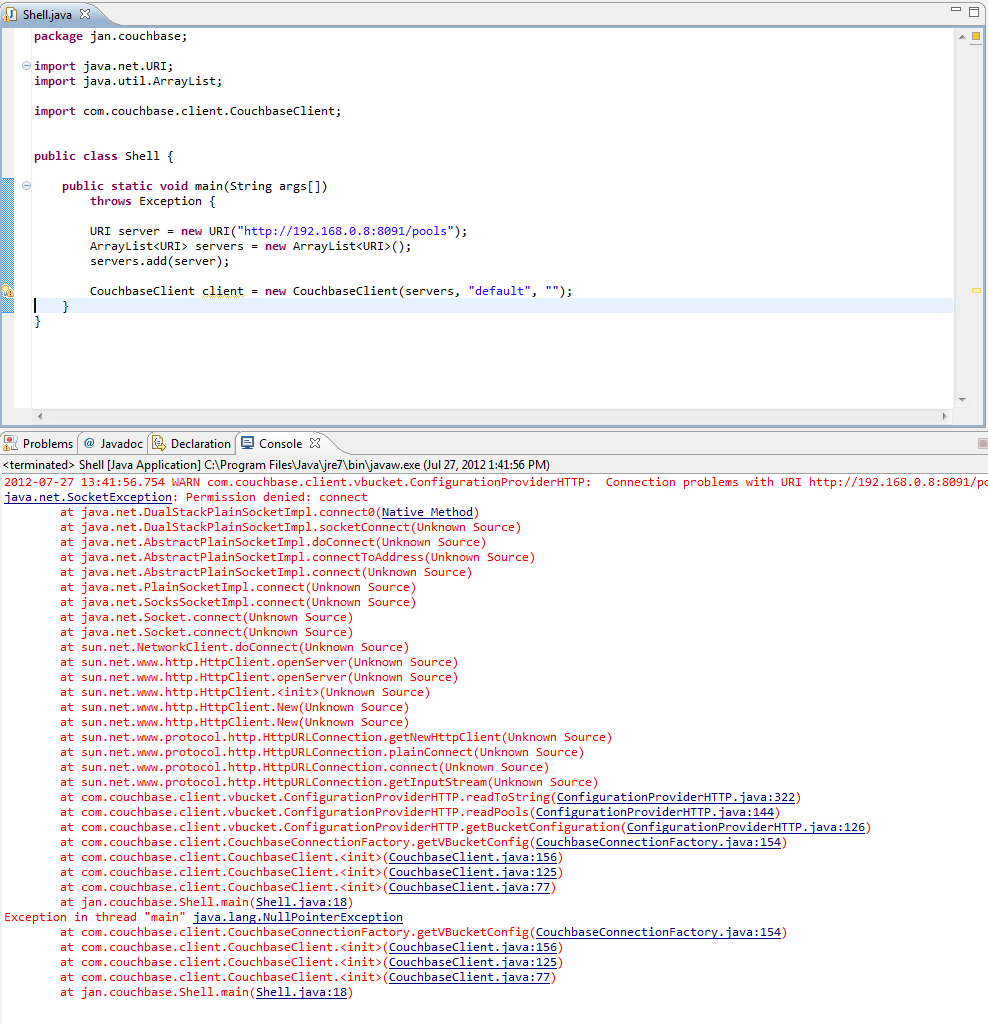


It looks to be failing due to a "Permission denied" exception.  FFS!  I'm starting to get slightly miffed. Running a quick wget indicates there should be no such permission issues.


Ah, ha!  Fortunately I've seen this before, it just took me moment for the old brain cells to remember. To fix the issue you need to add the follow as a VM param:
-Djava.net.preferIPv4Stack=true

Now that I can finally connect, let's get the KVPs from a bucket.   It looks like TAP is the way to go.

TapClient tc = new TapClient(servers, "default", "");
tc.tapDump("some id here");

tapDump returns a TapStream, but I can't find the TapStream dependency. This dude managed to find it, but looks like he may have other issues.

I'm getting bored, and my head is getting sore with all this brick wall hitting.  I know it's early, but I fancy a nice cold Never Mind The Anabolics, it's in a bottle so I don't have to worry about tap streams...

Oh, and it looks like my issue with installing on Win7 64-bit has been around a while.

Monday, 25 June 2012

Advanced Search on GitHub

Today I was cruising the MongoDB Java driver GitHub repo. I was interested in the implementation of the eval() method, as I wanted to ensure I cater for all returned types within mongometer.

Seemed simple enough, I thought.

I went straight to DB.java and saw that we're calling command() and extracting an object keyed by retval. Interesting, to see retval, a potentially project-wide constant, defined as a String rather than as an Enum. Anyhoo, this isn't a critique of the driver code, so I'll park that for now, I just wanted to find what could possibly be returned by eval().

An easy way to do this is to fetch the branch and search it locally. But I wouldn't really want to do this for every single project that I ever want to cruise? No way, Pedro! So, let's use the online GitHub Search.

    A good place to start: https://github.com/search
    Advanced Search : retval repo:mongodb/mongo-java-driver
    Search for: Code
    Search Language: Java

That all seems sane enough. Right?


Wow! That was unexpected. I haven't been returned the results limited to the filetype of Java, I've been returned a list of files that contain the term java. Let's have a quick look at the querystring.


It seems to be searching for Java, so let's swap out Java for retval, our actual search term.


Now you get the results for retval. We have an unknown number of matches for retval from within the Java driver code base. But is seems we have been returned results for every version of the file that the search term is found in. Let's park that and come back to it later.


You get the same results when you completely remove the language from the querystring. Let's remove it and leave it off as it reverts back to using Java as the search term.


It might not seem like it, but we're getting somewhere. Notice there is a repo parameter on the querystring. Let's pull the repo:mongodb/mongo-java-driver out of the q term and stick it in the repo parameter.


Now on the search form we have a separate input field where you can specify the repo.


So, let's try limiting it to a single version of each file in the repo. Hmmm, not sure how to do this. Anyone got any ideas? I must be missing something as I'd have thought that search is fundamental to any website these days. Anything I try seems to result in with the same error message.

Invalid search query. Try quoting it.

All I want to do is search files for a given string, without having to fetch the entire repo.

I'd look through the github.com repo to investigate further, but I don't seem to be able to find github on github.

To be continued...

Thursday, 21 June 2012

Key Stretching; an example

I've had quite a few questions about my previous post (from June 2010) on Passwords since I recently reposted it.

More specifically the questions and comments were around key stretching.

Q.  But doesn't looping that many times slow the password verification step down?
A.  Well yes.  That's kind of the point.  The user may experience negligible latency during the authentication process, this can be tuned to have no or little effect on the user experience.  This same delay is multiplied by the number of brute force attempts made by the attacker.

Q.  The attacker doesn't need the salt or the algorithm if they are going through the front door?
A.  Agreed.  Which is why you'd have some controls and triggers at the front door to alert when abnormal or atypical behaviour is detected.

Q.  If an attack gains access to a system, surely it's game over for user PII?
A.  The thing I like about key stretching is that a hacker needs to have access to the salt, the hashed password and stretching algorithm.  So, if you store the salt in a different table or even DB than the hashed password, the attacker would need to get their mitts on both tables or both DBs. Gaining visibility of the algorithm means that the attacker would also need to have access to, or knowledge about the specific implementation details; ie the source code. Typical environment configurations ensure that there is no way to get to a development environment from a production environment (and vice versa), making it difficult to gain access to the source.

This is a quick and dirty example of what key stretching would look implemented in Java.


This runs in around 0.75 seconds on my local box. Which means every iteration of a dictionary attack or a brute force attack would take the same time.

Caveat: this is purely an example of how you could implement stretching.

Monday, 18 June 2012

Creating your project with IntelliJ

Now we have a development environment configured, lets create the project and start taking it to the next level.

Creating a project in IntelliJ

New Project
New Project from Scratch
Enter the name: mongometer
Select Maven Module
Next
Select Create from archetype (I chose maven j2ee simple)

Arrrrg! Don't do this! Man, IntelliJ sat spinning the tyres for an age.  I ended up killing it and starting again.

To delete a project, close intellij and remove the project folder
projects are in IdeaProjects
$rm -r ~/IdeaProjects/mongometer

Second time around
New Project
New Project from Scratch
Enter the name: mongometer
Select Maven Module
Next
Deselect the create from archetype

Create a package
Create the classes and the properties file

Fix imports
Add dependencies to the pom.xml

This is what I need for mongometer

  • junit4.10
  • mongodb 2.7.2
  • ApacheJMeter_core 2.6
  • jorphan 2.6

Push to GitHub

$cd ~/IdeaProjects/mongometer
$git init
$git add *.java
$git add *.properties
$git add *.xml
$git commit -m 'Initial upload of the project'
$git remote add origin ssh://github.com/yourname/mongometer.git
$git push -u origin +master

VoilĂ ! You can go to your repo, and the project files are there.  Happy days.

Points of interest
  • The + performs a force push to github.  I'm guessing this happened because when I created a new repository on GitHub I opted to create the README file.  I won't do this again.
  • IntelliJ complained about setting up the repo outside of IntelliJ.  No problem, you just add the repo inside IntelliJ.  I've been an Eclipse person for years (though we've decided that we'd like spend some time apart) so I'm not 100% sure of how to do this inside IntelliJ just yet.
  • This is a great site for listing dependencies http://mvnrepository.com/ for setting up your pom.xml

Configuring the mongometer Development Environment

As I've already set up a git repository on Ubuntu and published the step-by-step, command-by-command instructions for doing this, I thought it would be worth publishing the same guides for setting up the entire development environment on Ubuntu.

Set up your JDK

Download
http://www.oracle.com/technetwork/java/javase/downloads/jdk-7u4-downloads-1591156.html

Configure
$tar -xvf ~/Downloads/jdk-7u4-linux-x64.tar.gz
$sudo mkdir -p /usr/lib/jvm/jdk1.7.0
$sudo mv jdk1.7.0_04/* /usr/lib/jvm/jdk1.7.0/
$rm -r jdk1.7.0_04
$sudo update-alternatives --install "/usr/bin/java" "java" "/usr/lib/jvm/jdk1.7.0/bin/java" 1
$sudo update-alternatives --install "/usr/bin/javac" "javac" "/usr/lib/jvm/jdk1.7.0/bin/javac" 1
$sudo update-alternatives --install "/usr/bin/javaws" "javaws" "/usr/lib/jvm/jdk1.7.0/bin/javaws" 1
$mkdir ~/.mozilla/plugins/
$ln -s /usr/lib/jvm/jdk1.7.0/jre/lib/amd64/libnpjp2.so ~/.mozilla/plugins/

Set up MongoDB

Download
http://www.mongodb.org/dr/fastdl.mongodb.org/linux/mongodb-linux-x86_64-2.0.6.tgz/download
$md5sum ~/Downloads/mongodb-linux-x86_64-2.0.6.tgz
69eece640fcb1684190a4585f31df954

Configure
$tar -zxvf ~/Downloads/mongodb-linux-x86_64-2.0.6.tgz
$sudo mkdir -p /usr/lib/mongodb/2.0.6
$sudo mv mongodb-linux-x86_64-2.0.6/* /usr/lib/mongodb/2.0.6/
$rm -r mongodb-linux-x86_64-2.0.6
$sudo mkdir -p /data/db
$sudo chown `id -un` /data/db
$/usr/lib/mongodb/2.0.6/bin/mongod --dbpath /data/db --logpath /data/db/mongod.log
$mongod --config /etc/mongod.conf

(from a new terminal start the shell)
$cd /usr/lib/mongodb/2.0.6/bin/
$./mongo
> db.test.save( { a: 1 } )
> db.test.find()

Set up Maven

Download
http://www.apache.org/dyn/closer.cgi/maven/binaries/apache-maven-3.0.4-bin.tar.gz
$md5sum ~/Downloads/apache-maven-3.0.4-bin.tar.gz
e513740978238cb9e4d482103751f6b7

Configure
$tar -xzvf ~/Downloads/apache-maven-3.0.4-bin.tar.gz
$sudo mkdir -p /usr/local/maven/3.0.4
$sudo mv apache-maven-3.0.4/* /usr/local/maven/3.0.4
$rm -r apache-maven-3.0.4

$sudo gedit /etc/environment

JAVA_HOME="/usr/lib/jvm/jdk1.7.0"
M2_HOME="/usr/local/maven/3.0.4"
MAVEN_HOME="/usr/local/maven/3.0.4"
M2="/usr/local/maven/3.0.4/bin"
PATH="/usr/local/sbin:/usr/local/bin:/usr/sbin:/usr/bin:/sbin:/bin:/usr/games:/usr/local/maven/3.0.4/bin"

Verifiy the configuration
Logout and login

$mvn -version
$mkdir ~/.m2
$sudo chown `id -un` -R ~/.m2

Set up IntelliJ

Download
http://www.jetbrains.com/idea/download/

$tar -xvf ~/Downloads/ideaIC-11.1.2.tar.gz
$cd ~/idea-IC-117.418/bin
$chmod +x idea.sh
$./idea.sh

(this is the initial install of intellij, so take the second option)
File -> Project Structure
Platform Settings -> SDKs
Add -> JSDK
 /usr/lib/jvm/jdk1.7.0/
 Select -> OK

Set up JMeter

Download
http://mirror.lividpenguin.com/pub/apache//jmeter/binaries/apache-jmeter-2.7.tgz
$md5sum ~/Downloads/apache-jmeter-2.7.tgz
73435baa6ed99c528dacfa36c7e1f119

Configure
$tar -zxvf ~/Downloads/apache-jmeter-2.7.tgz
$sudo mkdir -p /usr/lib/jmeter/2.7
$sudo mv apache-jmeter-2.7/* /usr/lib/jmeter/2.7/
$rm -r apache-jmeter-2.7
$/usr/lib/jmeter/2.7/bin/jmeter.sh

Thursday, 26 April 2012

Performance testing MongoDB

So, this morning I was hacking around in the mongo shell. I had come up with three different ways to aggregate the data I wanted, but wasn't sure about which one I should subsequently port to code to use within my application.

So how would I decide on which method to implement? Well, lets just choose the one that performs the best. Ok, how do I do that? Hmmm. I could download and install some of the tools out there, or I could just wrap the shell code in a function and add some timings. OR, I could use the same tool that I use to performance test everything else; JMeter. To me it was a no brainer.

So how do we do it?

There is a full tutorial here.

Simply put, you need to do the following:
  1. Create a Sampler class. 
  2. Create a BeanInfo class. 
  3. Create a properties file. 
  4. Bundle up into a jar and drop into the apache-jmeter-X.X\lib\ext folder 
  5. Update search_paths=../lib/ext/mongodb.jar in jmeter.properties if you place the jar anywhere else. 

How I did it

I tend to have a scratch pad project set up in my IDE, so I decided just to go with that. Just to be on the safe side, I imported all the dependencies from:
  • apache-jmeter-X.X\lib 
  • apache-jmeter-X.X\lib\ext 
  • apache-jmeter-X.X\lib\junit
I then created the two classes and the properties file.


I then exported the jar to apache-jmeter-X.X\lib\ext, and fired up jmeter.

Go through the normal steps to set the test plan up:
  1. Right click Test Plan and add a Thread Group. 
  2. Right click the Thread Group and add a Sampler, in this case a MongoDB Script Sampler. 
  3. Add your script to the textarea; db.YOUR_COLLECTION_NAME.insert({"jan" : "thinks he is great"}) 
  4. Run the test

Happy days.  You can then use JMeter as you would for any other sampler.


Future enhancements

This is just a hack that took me 37 minutes to get running, plus 24 minutes if you include this post. This can certainly be extended to allow you to enter the replicaset config details for instance and to pull the creation of the connection out so we're not initiating this each time run a test.

Monday, 12 March 2012

Mongodb MapReduce scope variables

I recently had a requirement for conditional emission from a map function. Essentially I only wanted to emit where the date was within a given range.

In SQL, grouping a count for a given time granularity within a date range would look something like this:

I wasn't 100% sure about the 'right way' to achieve this in NOSql/MongoDB. So this is a solution.
It requires you to know about scope variables. Problem is, I found that scope variables are not very well documented. You can find more about scope variables in the MongoDB documentation MapReduce-Overview. The relevant parts are:

      [, scope : <object where fields go into javascript global scope >]
and
      scope - can pass in variables that can be access from map/reduce/finalize.

Back to this example. First, let's define some data:

Before we implement this, lets get it working at the command-line, in our mongo shell:

What is happening here?

Well, we're selecting the sub-document of this collection where the value of "meh" is "meh". Then we've defined two dates; from and to to represent the boundaries of the date range, we're including these within the MapReduce function call. Basically what this means is that we can use what ever is defined here in the Map function (btw, we can also use them in the Reduce and Finalize functions).

Once we have this working from the shell, it is straight forward to implement it. This is the very same implemented in Java.

Caveat: This is an example of how to use scope variables, I'm sure if you go to any of the Events or gmane.comp.db.mongodb.user group you'll get some advice straight from the 10Gen guys.

Friday, 9 March 2012

Changing date types; from JavaScript UTC to Mongo ISODate

The scenario is this.

You have an HTML form that allows your customer to add an arbitrary amount of stuff to something. stuff is a partial JSON document which is a list of String/String and String/Date NVPs contained within something. Mongo will by default store the date as an ISODate. With that said, the something collection looks something like this:


The simple solution to the format issue is to display the Date as an ISODate on the form, thus when the form is submitted, the date can be treated just like any other string (though you still need to tell mongo to treat it as a Date and not a String, so you need to 'find' it and change the type; more on that later).

Would display: 2011-11-01T11:51:46.000Z

But that would be way too easy; in the real world, easy is considered as rare as unicorn herders. The Use Case/User Story/Whatever acceptance criteria is that we display the Date in the full UTC form. OK then.

Which would display: Tue Nov 01 2011 11:51:46 GMT+0000 (GMT Standard Time)

This is easily done, in fact, it is easier than displaying it as an ISODate, but now we have to parse it and convert to an ISODate, which involves finding it in the JSON document first.

Parsing a UTC date into an ISO is trivial but should have been easier than this - I needed to faff around with the DateFormat string before I got rid of the ParseExceptions.

This is roughly how I did it. Doesn't look too pretty tbh.


It's amazing how simple this should be. You set it up as a date, you pass in a date, yet you still need to explicitly convert it from initially from a String to Date, and then from UTC to ISO.

Tuesday, 3 January 2012

MongoDB and CRUD, or should that be ISUD

I started this blog to remind myself of the solutions to development issues I have along the way and as a general hinting mechanism to remind myself what is going on when I have been away from it for a while. If any of this means that someone else reading this saves themself a world of hurt or going down the rabbit-hole of death, then I'm glad that recording it publically rather than privately was helpful (though conversely, it is always important to learn from one's owner experiences).

In my first posting Simple mongodb equivalents, I wanted to remind myself of some of the basic differences around selection between SQL and NoSQL, and to give concrete examples of what this would look like in Java. In this posting I'll go through the next stage, the hinting mechanism for CRUD.

For those that associate crud with filth, flattery, disgust or disappointment, then you may be on the wrong blog. CRUD stands for CREATE, RETRIEVE, UPDATE, DELETE - though the RETRIEVE is usually replaced by get or SELECT at implemention and CREATE is replaced with INSERT. So, perhaps I'll call it ISUD instead.

First, set up the database, a user and set up an index.

The CREATE (or INSERT) of CRUD (or ISUD)
Here we a setting up some basic data in a collection named 'stuff' that lives in the 'isud' database.

...this is how you would do it from the mongo shell...
...and the Java implementation...

The RETRIEVE (or SELECT) of CRUD (or ISUD)
The selection or retrieval of a document from the collection 'stuff' can be rather powerful, as per Simple mongodb equivalents.

...this is how you would do it from the mongo shell...
...and the Java implementation...
Now let's do a similar thing but this time specify the fields we want returned.

...this is how you would do it from the mongo shell...
...and the Java implementation...

The UPDATE of CRUD
Everyone knows his name was Eric, not Derek, so let's fix that with an update.

...this is how you would do it from the mongo shell...
...and the Java implementation...
Please refer to Updating a document using the default ObjectId for the reasoning behind DBObjectFactory


The DELETE of CRUD
Finally, we can delete a document.

...this is how you would do it from the mongo shell...
...and the Java implementation...
It's all relatively straight forward really. Though none of this is rocket science, I for one find this a useful and succinct reminder or as previously stated; a hinting mechanism.

Tuesday, 13 December 2011

Unsupported major.minor version 51.0

I've been away from the coalface, as it were, for a couple of years, only returning to it in the past few months. And I have to say, not much as changed and some things never change.  One of those things is the denvercoder9 moment, and that is the reason I started to blog; I feel the pain so you don't have to.

Let me set the scene briefly. I have full visibility of, and total control over my development environment; happy days. However, when it comes to UAT and Production environments I'm flying completely blind and at times I feel like I'm performing keyhole surgery with only a sledge hammer and a forklift, oh, and no keyhole.

I spent some time putting together a stack that I could use as a template, a reusable pattern where, from application to application I could recycle the initial pipework and pretty much only change the data model. What I needed was something completely stateless, all I really need was CRUD, so I opted for a REST based approach; and for me that meant reference implementation, Jersey. The other thing was that I strived to make it as simple to deploy as possible; essentially a WAR to be dropped into the application server that could then update the persistence layer when the application server started up.

Everything went swimmingly. Well, that's a bit of a lie, I found that some browsers still do not support PUT and DELETE.

RESTful Browser Verb Check

BrowserGETPOSTPUTDELETE
FF7YesYesYesYes
Chrome14YesYesYesYes
IE8YesYesConverts to GETConverts to GET


Anyhoo, I readied myself to deploy to the UAT environment. This consisted of listing everything component and detailing every step of configuration. As this was the bedding-in phase I needed the entire environment configured, which included the installation of the JRE, application server, database and the application. This could have been smoother if I had access to the boxes, but nevertheless we got there in the end.

So now I have my environment set up and my application deployed, let's kick the tyres. To my horror I got a 500 back from the service. Dang. I didn't have access to the logs and the only person with access was on leave that day. So I waited.

After a bit more waiting, I finally got a hold of the logs. And found the culprit, the little blighter was sticking out like a strawberry in a bowl of peas.


I've seen you before, I thought, and fired off a mail to the box admin (who was WFH; I'd ideally walk round and discuss face-to-face) to verify the JRE running on the UAT box. Some time later it was confirmed UAT was running JDK-Y. I was using JDK-X, so the UAT environment was running an earlier version than that which I build the WAR with - makes perfect sense and matches exactly to the exception. Fine:

  • Download/Install JDK-Y
  • Change JDK-X to JDK-X (Preferences -> Java -> Compiler)
  • Clean project
  • Rebuild
  • Redeploy locally
  • Redeploy UAT
Same 500 came back. Pants. Scratch of the head.

  • Let's change the Change JRE System Libraries (Right-click project -> Properties -> Java Build Path -> JRE System Library -- double-click and change to JDK-Y)
  • Clean project
  • Rebuild
  • Redeploy locally
  • Redeploy UAT
Same 500 came back. Starting to get a little annoyed now.

I Googled it. Every post said the same thing about the runtime and compile time JDKs being different, but I know that and I've told Eclipse. I checked that the Jersey binaries - built with Java SE Y. I've told Eclipse I want to use JDK-Y. How many times do I have to tell it? OK, I thought, everywhere I see JDK-X, I'll change it to JDK-Y, even if it seems irrelevant.
  • Change Target Platform (Window -> Preferences -> Plug-in Development -> Target Platform -- double-click and change JRE name under the Environment tab
  • Change Project Facet (Right-click project -> Properties -> Project Facets -> Java -> Select JDK-Y from drop down
  • Clean project
  • Rebuild
  • Redeploy locally
  • Redeploy UAT

SUCCESS

The moral of the story is, well I don't really know. What I do know is, it is annoying that you have to tell Eclipse four times in four totally different locations that you want to use a different JRE, and it's difficult to debug an application in an environment when you don't have access to said environment.

Monday, 12 December 2011

Testing your document structure for inconsistencies within MongoDB - Part II

In a previous post we looked at how to validate your collection for structural consistency. We did this by creating a DBObject with the 'template' document structure and comparing this against the relevant collection. Testing your document structure for inconsistencies within MongoDB
Now, it's not exactly a leap of faith to extend that and rather than code the template we can define this in a json document. Now all we need to do it to pass the json document and the collection name as parameters saving a recompile for each and every test. Happy days.


Thursday, 8 December 2011

Updating a document using the default ObjectId

Here are a few facts about keys and the way MongoDB deals with them.
  • Documents in MongoDB require a key, _id, which uniquely identifies them.  
  • This is a 12-byte binary value, read more from the source of truth, ObjectId.
  • When inserting a new document, MongoDB will generate an ObjectId where one is not specified.
  • There is a 'reasonable' chance that this will be unique at the time of creation.  
  • All of the officially-supported MongoDB drivers use this type by default for _id values.

An annoyance I had with MongoDB, when I first started to use it, was the explicit update required on the default _id key/value pair.  To illusrate this here is a concrete example of what I mean.

I wanted to do this:
But I had to do this:
In this case, json is a JSON document passed from an HTML form via HTTP PUT, eventually ending up here at the DAO.  I was using the default _id implementation and thus would have expected save to do the figure that out and do the necessary work for me.

I just can't live those extraneous lines of code, it's too messy and too much to type every time.  I'll pull it out into a fromJson call, as I can see the pattern emerging and the odds of this reoccurring high.

I must have missed something in the API Docs as this cannot be an unusual requirement.  I would of at least expect to see it in a Util class...

Factory snippet:
Usage snippet:

I get to do what I wanted to now, but it still feels wrong.  It feels a little bit dirty.  It feels like a hack-o-la.  How can I do it better?

Wednesday, 7 December 2011

Tomcat and MongoDB

When I started with MongoDB I wanted to use it with everybody's old favourite application server, Tomcat.
There is no point reinventing the wheel so I hunted for usage examples.  I struggled to find any best practice implementation, so I decided to hack my own together.

A requirement I had was I had was I wanted to be able to deploy the web app to a range of different environments, so I needed the service to be flexible.  The simplest way I could think of was pulling the config from the application's web.xml file.


The Mongo object instance represents a pool of connections to the database so you will only need one object of class Mongo even with multiple threads.


web.xml snippet:


MongoService snippet:


Then from the data access object you can specify and authenticate to the relevant DB.

XxxDAO snippet:


This has been working like a dream for me proving to be an extremely convenient way to easily connect to Mongo.

Tuesday, 6 December 2011

Testing your document structure for inconsistencies within MongoDB

One of the advantages with schema-less design is that it works well for prototyping; you can have a collection of documents with each of the documents of variable structure. You can modify the document structure for one, some or all documents within the collection all without requiring a schema for the collection or each and every document.
However, this is also a disadvantage during prototyping; there are no constraints to stop documents within the same collection having variable structure. Deliberate updates to a document succeed silently as do accidental updates; ie when you update a document with a subdocument hanging off the wrong node. So when you assume you have consistency across all the documents, within a collection, but don't, you will run into some issues. You could also argue here that you're not coding defensively enough if you're not checking consistency at the time of execution; I'm not going to go into that right now though.

That exact structure inconsistency happened to me, and I ended up going down a rabbit hole. The smart thing to do was to blat the DB and recreate it during each test, but there were reasons that I didn't do that, which again I'm not going to go into here. Additionally the error that was coming back from performing an operation on the inconsistent structure wasn't obvious and didn't indicate to me that there was document structure inconsistencies, but that's another story.
Anyhoo, I didn't want this to happen again, so to verify the structural consistency of a collection I now pull in a json template; an example of the structure of the document I'm expecting to find within the collection I'm working with, and compare it to the collection in the DB. You can define your template in a json/txt file or you can manually create the DBObject. Simply put, I perform a symmetrical diff on the documents that are contained in the collection(s) I'm working with, and report on any additional field not defined in the template, I also report on any field that is defined in the template but not the document.

This example creates a DBObject with a few NVPs at the root, a couple as subdocument NVPs and finally an array.


We use this 'template' to compare against the documents within the tests collection.

This is all very lightweight but as a method to verify crude consistency it is very handy, for me anyway.


Monday, 5 December 2011

Security and MongoDB

The MongoDB Security Model has some scope for improvement.
  1. As default, Authentication is off. MongoDB is designed to run in a 'trusted' environment, depending on the network configuration to ensure the security of the environment.
  2. Pre v2 authentication is not supported within a sharded deployment.
  3. Once authenticated a user has full read-write to the entire DB. There is no concept of roles or groups or such like.
Now, I wanted to deploy with Security turned up to the max, so here I will present a practical example.
This is a typical set-up I'd use for my development environment; separate machines each running mongod.

Firstly, let's set up the replicaset.
On the primary we can define and run the replicaset config:

Nothing fancy here, all standard stuff. After a few minutes the dust settles and the primary and secondary identify themselves. You can check the status of the replicaset with:
Now, on each box in the replicaset you'll need to create a key (must be valid Base64 and 1K or less):
You can now bring down both instances. Either hit ctrl+c or do it the right way:

Now we can start each of the mongod instances with the keyFile:
Word of warning here. I spent a significant amount of time trying to set this up on v2.0.0 - yes I know it is a bit dumb to go with a x.0.0 version, but you'd think that something as basic/fundamental as this would be thoroughly tested. Well, suffice to say I ended up moving to the latest binary to get this basic functionality to work. It was annoying at the time, but it certainly made me read the available documentation multiple times.
So now on the primary we can create the admin user aka root, super...
As we have a replicaset these users will existing in admin and mydb on both instances.

This whole process should take about 5 minutes to configure provided you're using a stable, well tested version.
I got unlucky and wasted hours on a buggy version grappling with errors that I couldn't decipher, feeling a bit denvercoder9 (http://xkcd.com/979/).
I went through the pain so you don't have to...

Sunday, 4 December 2011

A simple guide to finding distinct array values in a MongoDB collection

So you want to find unique values within an array within a document in a collection? A reasonable request.
In ANSI SQL you'll be using DISTINCT, JOINS and GROUP BYs, stuff you're used to, but in the NoSQL realm your best bet is mapreduce.
It might seem a little bit like hard work, and probably a little intimidating at first, but it is certainly worth it; mapreduce is an extremely powerful tool.

Set up the collection, the map and reduce functions, and execute the mapreduce command:


But now you want to find unique values within an array within each document in an entire collection.


The map function in this example iterates over each of the items and emits the key/value of each array element.
The reduce function aggregates the key/value from each of the emits from the map function. In this example we're looking at unique keys and maintaining a count of the unique keys.
If you're looking to find the distinct array elements for a single document, simply specify the document index. For the entire collection, just leave the query out. *simples*

Saturday, 3 December 2011

Simple mongodb equivalents

After making a noob error today, I realised that some of the documentation could use a boost.

By default mongo returns the entire document.


All fields for the matched document will be returned

And in java


To return only certain fields, you need to let mongo know which ones you want


The will only return the fields meh and feh from the matched document

And in Java


You can also say 'all fields except for...'


This will return all the fields in the matched document expect for meh

And in Java