So, yesterday we had the
CouchBase guys in the office, I think it was some kind of retaliatory strike to me having brought in the
MongoDB guys a few weeks prior.
In the interest of being able to form a balanced view I thought I'd test out the "SIMPLE" part of the CouchBase "SIMPLE, FAST, ELASTIC" tag line by downloading, installing, creating and query some data. I like
simple so this looks like it was made for me.
It takes me only a minute or so to update the version of MongoDB I run on my Ubuntu servers; it is very simple, but I've done it few times, so some of the ease of update is simply down to practice. This isn't really going to be a 100% fair and direct comparison if I'm completely honest. However, for the purposes of comparison we can use a
quick guide to downloading, installing, creating and query some data. All the information you need is on one, simple page.
MongDB
Download: 27 seconds
Unzip package: 4 seconds
Create data directory: 9 seconds
Start server: 19 seconds
Start shell: 16 seconds
Create a document: 16 seconds
Query collection: 8 seconds
Total time: About 2 minutes.
CouchBase
Download: 2 minutes, 31 seconds
Install: (via the Wizard) 2 minutes 52 seconds + 3 minutes (Had to run this a seconds time as I was shown a 1618 error saying install was already in progress, which it wasn't. Also, after the wizard said it had finished the install there was no CouchBase directory in the default location and a browser didn't pop up pointing to the Admin UI, as per the install guide)

Configure server: 1 minute. I wasn't sure how much RAM I should be dedicating to CouchBase, nor was I completely sure which bucket type I should be choosing. The other niggly things with the install were the fact I had to complete the product registration before I could complete the configuration.
I'm not sure what it's doing here tbh...

Start shell: No time recorded. I couldn't see a quick start, simple, single guide anywhere. I had to google "couchbase quick start guide" which initially took me to a page where I could request quotes around pricing and duration. Gave up after 10 minutes. Looks like I may have to do this via the Admin UI.
Insert data: No time recorded. As I couldn't find how to connect to the server via a shell, I hunted around and found this
posting; it looks simple. I couldn't find the 'Document button' that was being referred to though. I hunted around for another 15-20 minutes until I got frustrated and bored. I gave up.

Total time: DNQ
I'm afraid CouchBase has failed my definition of simple. Maybe they use a different dictionary, or maybe I'm just too simple. If anyone can point me towards a one-pager, simple, 101, 'get started quickly guide', then I'd appreciate it.
Let's give it another. So many people are using this that this must be a one off. So, I uninstall and restart my box. Then install afresh. I continue through the default settings. This time when I get to the Console I am met with this...
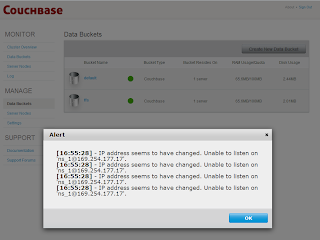
Not only can I not create a Document, I can barely use the Admin UI because of the modal alert that keeps popping up... FFS!
To get over this I do the following:
cd %COUCHBASE_HOME%\Server\bin
service_stop.bat
service_unregister.bat
Edit the script service_register.bat
Replace NS_NAME=ns_1@%IP_ADDR% with the 127.0.0.1.
service_register.bat
service_start.bat
Final effort. I uninstalled yet again and downloaded the latest version 2.0.0-dev-preview-4 and ran through the install process. Everything came unstuck when the wizard hit the 'Computing space requirements'; we basically hung at this stage. I wasn't able to cancel the install, so I had to kill the process. I tried once more and one last time - same result. There is a saying, 'If at first you don't succeed, try once more and give up.
 UPDATE:
 2012 Olympic Opening Day
$wget http://packages.couchbase.com/builds/1495/couchbase-server-community_x86_64_2.0.0-1495-rel.deb
$sudo dpkg -i couchbase-server-community_x86_64_2.0.0-1495-rel.deb
dependency error
$sudo apt-get install libssl0.9.8
$sudo dpkg -i couchbase-server-community_x86_64_2.0.0-1495-rel.deb
Now I can hit the Admin UI. I tap up 192.168.0.8:8091
We're getting there; I want to install some samples; I chose the beer sample, no surprise really. I was thrown back an error.

I hit next again and it said the sample was already installed. OK. So I unseleted the sample and hit next again. Success. So, semi-SIMPLE, it took less than 5 minutes; all I had to do was be careful about my choice of OS and grab the very latest build (-;
Thanks to
Frank Weigel who pointed me at the latest build.
Initial thoughts are:
- it's weird not having the shell and doing everything via a web UI
- from the brief look at the beer sample, it looks to my uneducated eye that we are defining the functions by_key_value, by_location and brewery_beers in an almost utility helper class document.
Now may the time to go and find some 101 documentation (-;