Showing posts with label Permission denied. Show all posts

Friday, 27 July 2012

CouchBase: Permission denied

It's 1400hrs, I have an hour or so to kill, so I going take some blog notes as I play with CouchBase. I must be having one of the those weeks where nothing is going to go well; thankfully we're almost at the end of the week.

I'm finally up and running with an instance of CouchBase (though I had to change OS and grab the latest build), and I can see buckets and documents.  Yay!  The next logical step for me is to connect programmatically, and maybe create a prototype app.

Let's watch the video as it will only take 5 minutes. I love the fact this it titled "Get Started in 5 Minutes" but the video is 11 minutes long...

To save you some time, download the driver and add it to your classpath; saved you 10 minutes and 32 seconds.

I believe a 'Hello, World!' program should demonstrate the simplest thing possible, so I just wanted to connect to the instance.

public static void main(String args[]) 
 throws Exception {

 URI server = new URI("http://192.168.0.8:8091/pools");
 ArrayList servers = new ArrayList();
 servers.add(server);
        
 CouchbaseClient client = new CouchbaseClient(servers, "default", "");
}
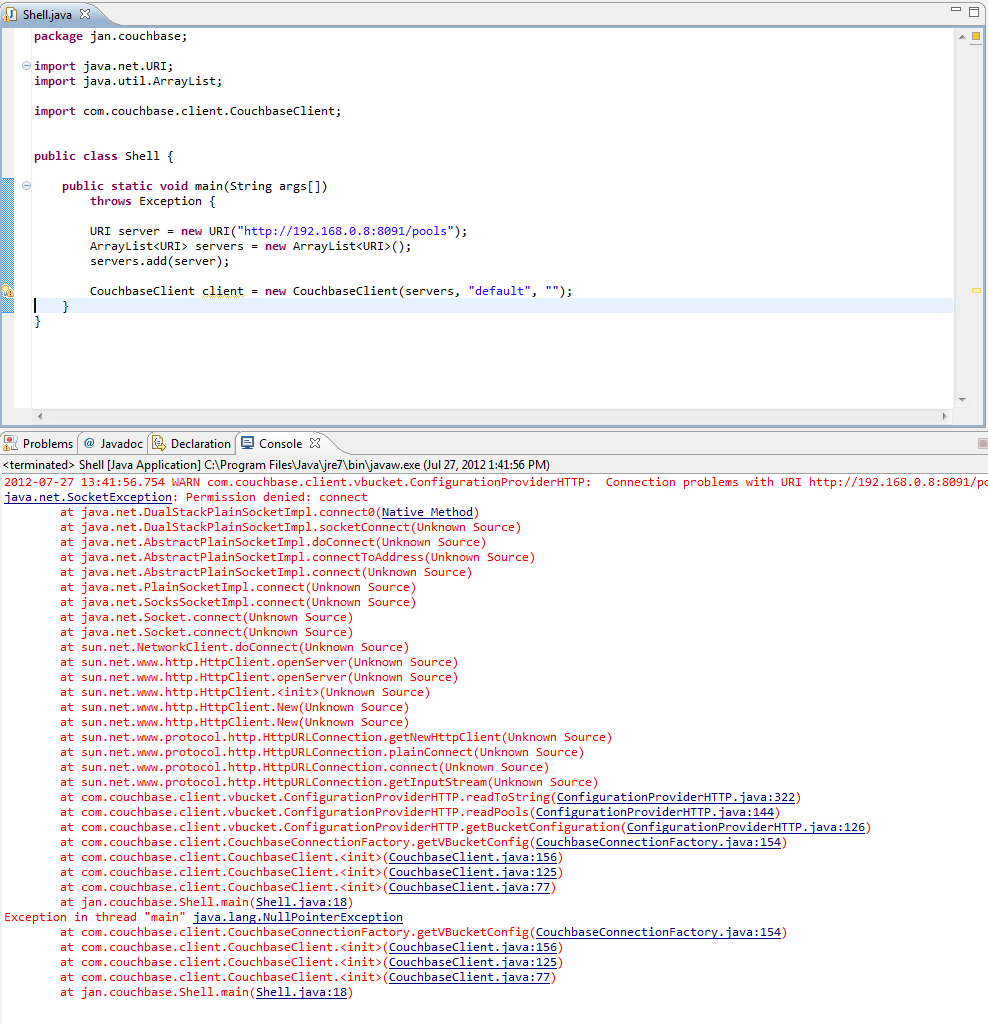


It looks to be failing due to a "Permission denied" exception.  FFS!  I'm starting to get slightly miffed. Running a quick wget indicates there should be no such permission issues.


Ah, ha!  Fortunately I've seen this before, it just took me moment for the old brain cells to remember. To fix the issue you need to add the follow as a VM param:
-Djava.net.preferIPv4Stack=true

Now that I can finally connect, let's get the KVPs from a bucket.   It looks like TAP is the way to go.

TapClient tc = new TapClient(servers, "default", "");
tc.tapDump("some id here");

tapDump returns a TapStream, but I can't find the TapStream dependency. This dude managed to find it, but looks like he may have other issues.

I'm getting bored, and my head is getting sore with all this brick wall hitting.  I know it's early, but I fancy a nice cold Never Mind The Anabolics, it's in a bottle so I don't have to worry about tap streams...

Oh, and it looks like my issue with installing on Win7 64-bit has been around a while.

Saturday, 16 June 2012

Install git on ubuntu

This is a brief step by step guide to install git and hook up to github using ssh.

Get git
$sudo apt-get install git-core

Check the install
$which git
$git --version

Configure git
$git config --global user.name "Firstname Lastname"
$git config --global user.email you@domain.com

Set up your ssh key
$ssh-keygen -t rsa -C "you@domain.com"
[hit enter]
set your key password
Your identification has been saved in /home/username/.ssh/id_rsa.
Your public key has been saved in /home/username/.ssh/id_rsa.pub.
The key fingerprint is:
fingerprint you@domain.com

Add the key to github
$less ~/.ssh/id_rsa.pub
Copy the key to your clipboard

Go to your github Account Settings

Click "SSH Keys" in the left sidebar
Click "Add SSH key"
Paste your key into the "Key" field
Click "Add key"
Confirm the action by entering your GitHub password

Verify the key
$ssh -T git@github.com
Y
enter the key password

You should get a success, "but GitHub does not provide shell access".

Set up a test repo
$mkdir repo-name
$cd repo-name
$git init
$touch README
$git add README
$git commit -m 'first commit'
$git remote add origin https://github.com/gitusername/repo-name.git
$git push -u origin master

you'll get a 403 error

Getting past the 403 error
$vi .git/config
change https for ssh
$git push -u origin master

you'll get a Permission denied (publickey) error

hmmm

$ssh-add -l shows the same fingerprint as the account settings on github
$ssh -vT git@github.com comes back saying I have successfully authenticated...

Getting past the Permission denied error
$cd ~/.ssh
$vi config

Host github.com
User git
Port 22
Hostname github.com
IdentityFile ~/.ssh/id_rsa
TCPKeepAlive yes
IdentitiesOnly yes

$git push -u origin master

Happy days! You should now see the README file on github